
Plugins
Plugins for GrandMA2 and GrandMA3 are small software extensions created by third parties. Plugins can streamline processes or add new features to the console software. At A-art.es, we create plugins for the GrandMA2 and GrandMA3.
We have a growing collection of plugins in https://addondesk.com/stores/aart-iluminacion/.
We also create custom plugins upon request. Contact us for a personalized quote.
MIDI Mapper
Assigning and reassigning your USB MIDI controller to GrandMA3 PC software is easier than ever with Midi Mapper. Simply move a control and press the on-screen button to assign it to any actuator, command button, or encoder.
Midi Mapper redirects MIDI input to whatever you've assigned to the button, encoder, or trigger at any time. It doesn't matter if you change the trigger page, select a different function group, or configure a different function for an assigned trigger key.
You can create multiple configurations for different phases of your workflow or users. These configurations are saved to a USB drive so you can use them in different presentations.

Rapid Knobs
The GMA3 console features faders and knobs connected to the players. When assigning a sequence to a player, you can use this fader or knob to adjust, for example, the sequence's intensity level. With a fader, you can change this level from 0 to 100 (%) with a single movement. Previously, this required turning the knob several times. The RapidKnobs plugin was created to speed up this process and allow the knobs to move in larger increments when turned more quickly. Starting with version 2.3 of the GrandMA3 software, you can adjust the knob increments, thus eliminating the primary reason for creating RapidKnobs.
However, there are two reasons why you might want to use RapidKnobs. First, it provides dynamic speed, allowing for precise adjustments by slowly turning the knob, unlike the static solution of the MA software. Second, RapidKnobs can be configured to separate the knob from the button, allowing them to be used for two completely different purposes.
Now that the main advantage of RapidKnobs has been incorporated into the GrandMA3 software, I have decided to stop selling RapidKnobs and make it available for free.

Run LUA
Boost your programming speed with this Lua Programming Kit.
The package includes two tools that will greatly simplify plugin programming.
RunLua can run your Lua code from an external editor like Microsoft Visual Studio Code directly in grandMA3. Forget about copying and pasting code. With RunLua, you'll have a direct connection, as if Visual Studio were part of the grandMA3 software.
GMA3_APIdummy is an extensive Lua file that contains dummy files for the GMA3 API functions.
With this file in your Lua folder, Visual Studio's Autocomplete feature will recognize these functions.
This will prevent typos and speed up your programming.
The PRO version includes important additional features:
Automated backups will give you the assurance of not losing your work and the ability to recover previous versions when you need them.
Automated version numbering will record each new build so you'll never have any doubts about which is the latest version.
Component integration allows you to add additional files to your projects, such as function libraries or data groups. All Lua components are tested together and can be used individually or included within the main plugin.

DMX512 Universe tester
Regardless of how well you label, if you use multiple universes, there may be times when you're unsure which universe is connected to a particular cable. If you have a DMX tester handy, this plugin will allow you to identify each universe. When activated, the level of channel 512 for each universe will be set to the universe number. This extremely easy-to-use plugin is essential for troubleshooting medium and large DMX networks.

MultiSave
MultiSave 2.0 is an efficient plugin that saves the show file to all connected drives. Double-clicking the plugin opens a simple menu for configuring save options. You can set a time interval for automatic saving, a countdown timer to cancel automatic saving, enumeration to avoid overwriting previous versions, and disable internal saving to save your files only to external drives.

Chess
Chess for MA3 is a virtual chessboard that works in MA3.
You can play against an opponent on the same console or on any other console in the session.
Chess for MA3 knows all the rules of chess and only allows valid moves. For beginners, the game can show the valid moves of the selected piece.
Chess for MA3 doesn't calculate countermoves, so you'll have to find someone to play with…
Attribute Picker for GrandMA2
The MA2 Attribute Selector helps you create a design to quickly select colors during a live show.
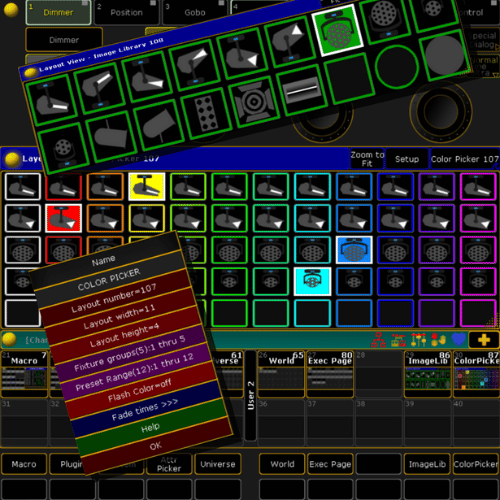
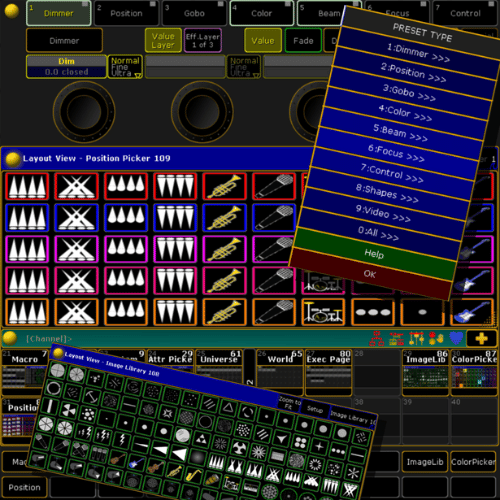
The plugin lets you select multiple fixture groups and assign presets to each group. Using this information, it creates a sequence for each group with the different presets. It also creates a layout with buttons to launch these presets.
You can assign icons to the buttons for quick and easy identification. In a live performance, this allows you to select presets with a single button, and they won't be lost when you launch effects or clear the programmer.
The Light version lets you create a Picker for colors. With the Full version, you can also create Pickers for other attributes such as position or gobo.
An essential tool for playing live with MA2 consoles.